
Android Help
Teen Patti Star Not Opening or Crashing: What to Check on Android
If Teen Patti Star will not open, closes unexpectedly or stays on its loading screen, start by identifying exactly where it stops. A crash immediately after tapping the icon is different from a loading failure after login.

Method: a public-documentation guide, not a hands-on test of a Star build. Diagrams are illustrative. Sources & limitations
Identify the Failure Before Choosing a Fix
Watch one launch attempt and note the last screen that appears.
Swipe the table sideways to compare.
| Symptom | Useful first check | What it does not prove |
|---|---|---|
| App closes immediately | Restart, version and device compatibility | That the account was deleted |
| Logo remains indefinitely | Connection and loading behaviour | That Android failed to install the app |
| Login opens, then closes | Exact login stage and reproducibility | That the password is wrong |
| One game mode crashes | Mode-specific steps and app version | That every part of the app is broken |
| App freezes after returning from another app | Fresh launch and background-transition behaviour | That more permissions are required |
| Several unrelated apps also crash | Wider phone or system problem | That Teen Patti Star alone is responsible |
App closes immediately
- Useful first check
- Restart, version and device compatibility
- What it does not prove
- That the account was deleted
Logo remains indefinitely
- Useful first check
- Connection and loading behaviour
- What it does not prove
- That Android failed to install the app
Login opens, then closes
- Useful first check
- Exact login stage and reproducibility
- What it does not prove
- That the password is wrong
One game mode crashes
- Useful first check
- Mode-specific steps and app version
- What it does not prove
- That every part of the app is broken
App freezes after returning from another app
- Useful first check
- Fresh launch and background-transition behaviour
- What it does not prove
- That more permissions are required
Several unrelated apps also crash
- Useful first check
- Wider phone or system problem
- What it does not prove
- That Teen Patti Star alone is responsible
An error screenshot is helpful. If recording a short video, hide notifications and avoid capturing passwords or login codes.
The goal is to collect a reproducible description, such as “the app closes after I tap the same game mode,” rather than repeatedly reporting that it “does not work.”
Record one repeatable launch attempt
Keep a two-attempt log
Use the same app and the same action twice, changing just one reversible condition. This blank log is for your observations; it is not a recorded Star test.
Swipe the table sideways to compare.
| Record | First attempt | Second attempt |
|---|---|---|
| App version and action | ___ | Same version/action, or explain change |
| Last screen reached | Icon / logo / login / lobby | ___ |
| Result and time | Closed / froze / error; time ___ | ___ |
| One change | None | Restart / connection / other ___ |
App version and action
- First attempt
- ___
- Second attempt
- Same version/action, or explain change
Last screen reached
- First attempt
- Icon / logo / login / lobby
- Second attempt
- ___
Result and time
- First attempt
- Closed / froze / error; time ___
- Second attempt
- ___
One change
- First attempt
- None
- Second attempt
- Restart / connection / other ___
If both attempts close before a login screen appears, an OTP resend is not the next diagnostic step. If the app stays open and displays a connection message, report that message instead of calling it a crash. Stop repeating an action that could submit a purchase or account request twice.
Confirm Which Teen Patti Star App You Have
First record the installed app identity and version. A shared name is not enough. This guide uses the Dream Global.TW listing (com.mengtegame.xingcakesfunny) as its app reference and provides general checks, not a reproduced device diagnosis.
Start with a Fresh Launch and Phone Restart
Close the app and reopen it once. If the same problem occurs, use Android’s App info page to force stop it, then restart the phone.
The exact settings route varies, but it commonly begins with Settings → Apps → Teen Patti Star.
Google recommends restarting, checking updates and force stopping as part of troubleshooting an installed Android application. It also distinguishes app-specific problems from wider device issues. Google’s Android app troubleshooting guide.
After restarting, try the same action that failed before. Avoid changing several settings simultaneously, because you will lose track of which change affected the result.
If the problem disappears, note whether it returns after a particular action. One successful launch is useful evidence, but it does not necessarily establish that an intermittent issue has been resolved.
Check the App and Android Versions
Open the matching Google Play listing and see whether an update is offered for your device.
An update shown on another phone or download website does not establish that the same build is available or compatible with yours. Record your installed version through App info or the application’s own settings, if accessible.
Check for Android system updates through your phone’s settings as well. Follow the device manufacturer’s normal update process.
Do not install an old or modified APK simply because someone describes it as a crash-free edition. That can introduce another compatibility problem or replace the application with an unidentified build.
If the crash started immediately after an update, record the approximate update date and the new version. Report that timing without assuming the update is definitely the cause.
Separate Connection Problems from Local Crashes
If Teen Patti Star reaches a loading screen but never finishes, test whether other online services work.
When appropriate, compare one trusted Wi-Fi connection with mobile data. You do not need to change networks repeatedly; a controlled comparison is more informative.
If the app works on one connection and stalls on another, that suggests a connection-dependent problem. It does not identify whether the cause is the router, network filtering, routing or an application service.
If it closes at the same point on both connections, report that result. It makes a simple network explanation less convincing, although it does not rule out all online-service issues.
A loading failure alone is not proof of a server outage. Confirm outages through the developer rather than inventing a maintenance schedule.
A comparison that avoids a false diagnosis
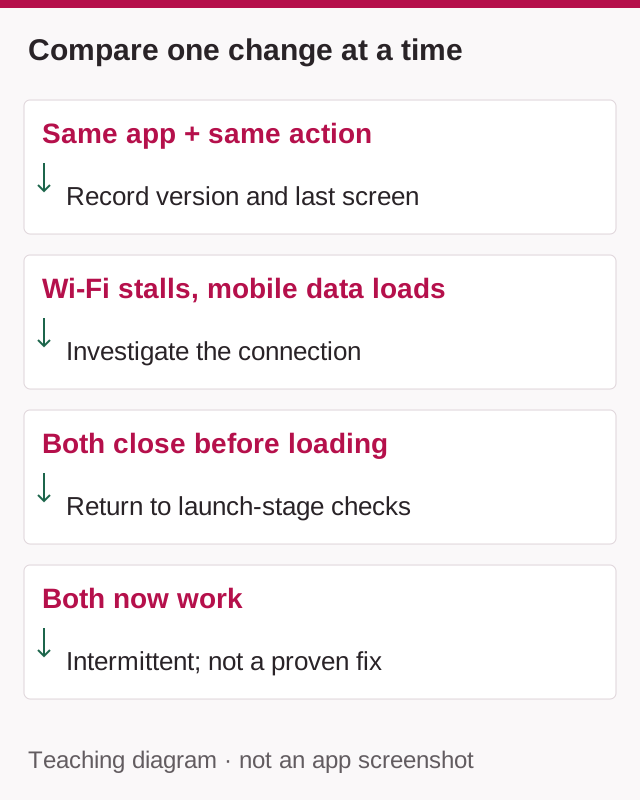
Suppose the app reaches its loading screen on Wi-Fi but continues normally on mobile data. This is an illustrative scenario, not a measurement of Star. The difference makes the connection worth investigating; it does not prove that the Wi-Fi provider blocks the app or that the app's servers are down.
Keep the app version, account and action the same while comparing connections, if doing so is practical and within your data allowance. Note the time and result. If both attempts now succeed, report an intermittent issue rather than a confirmed fix.
If the app closes before the loading screen on both connections, stop repeating network changes and return to the launch-stage checks. If several unrelated apps also fail, describe that wider symptom to device support. This prevents one observation from turning into an unsupported diagnosis.
Check Storage Without Removing Account Information
Inspect available internal storage. A phone close to its storage limit can struggle to complete downloads and updates; Google includes storage checks in its basic installation troubleshooting. Google Play storage and download checks.
Remove files you recognise as unnecessary, such as duplicate downloads. Avoid deleting unfamiliar folders or using an aggressive cleaner as a first response.
Keep storage separate from memory. Closing unused applications may reduce competing activity, but it does not create permanent storage space.
There is no verified universal amount of free storage that guarantees Teen Patti Star will run correctly. Follow any published device requirements and leave reasonable working space rather than aiming for an invented fixed threshold.
Understand “Clear Cache” Before Tapping It
Android may offer both Clear cache and Clear storage or Clear data. Read the label carefully.
Clearing cache targets temporary files. Clearing storage resets substantially more local application information and may remove the session details that currently give you access.
For this reason, cache clearing is the more limited option to consider first. It is not a guaranteed cure, and the app may need to download temporary content again afterward.
Before any broader reset, record your Player ID, profile name and recovery method if those details are available. If you cannot reach them because the app crashes immediately, say so when contacting support.
Do not assume a screenshot of a chip balance is equivalent to an account backup.
Investigate Feature-Specific Crashes
Suppose the main lobby works, but the app closes when opening one particular game or advertisement.
Record the feature, the exact action and whether the behaviour occurs every time. Note whether the issue happens before or after the content appears.
Do not automatically enable camera, microphone, contacts or SMS access. A crash does not establish that those permissions are necessary.
Likewise, avoid treating Android System WebView or Google Play services as the cause without evidence. Shared-component troubleshooting may be relevant if the failing feature uses those components or several apps show similar symptoms, but this dependency has not been verified here for every Teen Patti Star screen.
A focused support report is more useful than a long list of unrelated settings changes.
Protect Your Account Before Reinstalling
Reinstalling should be a considered step because local data can be removed.
First establish whether the account uses a recoverable sign-in method. If your version offers guest play, account binding or another recovery option, read the actual instructions rather than assuming how it works.
The public material reviewed for this guide does not establish a universal guest-account restoration procedure.
If recovery is unclear, contact the developer before uninstalling. Explain that the application is unusable and that you want to preserve the existing account.
Do not factory-reset the phone to troubleshoot one game. That affects far more information than the application itself and is disproportionate to an unexplained app-specific crash.
Send a Useful Support Report
Use the support contact on the matched store listing:
app_developer@dreamglobal.com.tw
Include the phone model, Android version, app version, installation source and the last screen reached. Add the approximate time of the failure and the results of your restart, update and connection checks.
A concise report might say:
Teen Patti Star opens to the lobby but closes whenever I select the same game mode. This occurs after a phone restart and on both Wi-Fi and mobile data. My phone model is [model], Android version is [version], and app version is [version]. I have not cleared app storage or uninstalled because I need to preserve account access.
Send account identifiers only through the verified support channel. Passwords, one-time codes and banking credentials are unnecessary for a crash report.
Frequently Asked Questions
Does a crash mean my account is gone?
No. A local application failure does not establish that server-side account information has been deleted.
Should I keep reinstalling until it works?
No. Repeating an unsuccessful reinstall adds little diagnostic value and can complicate account recovery.
Will a VPN fix the problem?
It is not a general crash solution. Start with ordinary connection checks rather than adding another network variable.
Does the published crash fix guarantee my issue is solved?
No. It is a release-note statement, not a device-specific diagnosis.
When should I stop troubleshooting?
Stop making changes when the remaining steps would risk account access or require unidentified software. Preserve your findings and let the developer investigate the reproducible failure.
Sources & scope
Public sources checked on 9 September 2026. Examples are illustrative; no hands-on device test of a specific app was performed. Table and platform rules may differ.
- Official Teen Patti Star listing
- Google’s Android app troubleshooting guide
- Google Play storage and download checks
Related guides
Android Help
Teen Patti Star “App Not Installed”: Package Conflicts and Update Checks
Separate a failed first install from a rejected update, parsing error or launch crash. Keep the working app and choose the right checks.
Account Help
Teen Patti Star OTP Not Received: What to Check
Separate an SMS delivery failure from an expired code or missing login option. Explains what to tell support without exposing private information.

Account Help
Teen Patti Star Account Missing After Changing Phones: What to Check
Compare the app, sign-in route and Player IDs on two phones. Distinguish a fresh guest profile from a missing account while preserving old-phone access.