
Account Help
Teen Patti Star Account Missing After Changing Phones: What to Check
If Teen Patti Star opens on a new phone with an unfamiliar profile or empty progress, that does not automatically mean the old account was deleted.
Method: a public-documentation guide, not a hands-on test of a Star build. Diagrams are illustrative. Sources & limitations
Compare the two phones before changing either account
Which of these three situations matches?
Old phone works, new phone has a different Player ID: preserve the old session. Compare the app and sign-in method before starting any account-recovery process.
Both show the same Player ID, but a balance or progress item differs: record the missing item, time and relevant screen. This is different from proving ownership of an unknown account; the operator needs to investigate that record.
Old phone is unavailable and you used guest access: check whether the app documented a linked login or recovery route. A phone backup cannot promise restoration of every app’s data. Do not pay someone who promises to recover an unlinked profile from the display name alone.
Keep full identifiers for the verified operator; redact them in public posts. This website can correct a guide, but cannot search the game’s account database.
If the old phone still opens the expected profile, keep that access while checking the new phone. A different display name alone is not enough to establish that an account has been lost.
Swipe the table sideways to compare.
| Compare | Old phone | New phone |
|---|---|---|
| App identity | Record the package and source if available | Confirm it is the same application |
| Sign-in route | Note guest, phone or another available method | Use the corresponding method, if supported |
| Player ID | Save privately if the app shows one | Compare with the displayed ID |
| Outcome | Can the expected profile still be opened? | Login failure, missing OTP or a different profile? |
App identity
- Old phone
- Record the package and source if available
- New phone
- Confirm it is the same application
Sign-in route
- Old phone
- Note guest, phone or another available method
- New phone
- Use the corresponding method, if supported
Player ID
- Old phone
- Save privately if the app shows one
- New phone
- Compare with the displayed ID
Outcome
- Old phone
- Can the expected profile still be opened?
- New phone
- Login failure, missing OTP or a different profile?
Do not log out, erase app data or reset the old phone solely to test recovery. If the block is SMS delivery, follow OTP not received checks. If the app itself closes, use the crash guide. Send account evidence only to the verified app operator; this website cannot restore accounts.
You may have installed a different application, entered through a different sign-in route or started a new local session. Device transfer may also have copied the app without restoring the information needed to access the previous account.
Begin by preserving the old phone and comparing what each device actually shows.
The public material reviewed for this guide does not document a universal Teen Patti Star account-transfer procedure. The checks below explain how to narrow the problem and prepare a useful recovery request without promising that every account can be restored.
Confirm That Both Phones Have the Same Product
First record the installed app identity and version. A shared name is not enough. This guide uses the Dream Global.TW listing (com.mengtegame.xingcakesfunny) as its app reference and provides general checks, not a reproduced device diagnosis.
Describe What “Missing” Means
Different symptoms require different questions.
| What appears on the new phone | What to check first |
|---|---|
| A new profile or Player ID | App identity and sign-in route |
| The old name but different progress | Player ID and account association |
| No login option you recognise | Product, version and supported access methods |
| A sign-in error | Authentication failure rather than account deletion |
| A blank or loading profile | Connection and account-loading behaviour |
| The old account still works on the old phone | Preserve that access and compare records |
| An explicit suspension or deletion message | The stated account status and official support process |
A new profile or Player ID
- What to check first
- App identity and sign-in route
The old name but different progress
- What to check first
- Player ID and account association
No login option you recognise
- What to check first
- Product, version and supported access methods
A sign-in error
- What to check first
- Authentication failure rather than account deletion
A blank or loading profile
- What to check first
- Connection and account-loading behaviour
The old account still works on the old phone
- What to check first
- Preserve that access and compare records
An explicit suspension or deletion message
- What to check first
- The stated account status and official support process
A matching nickname is weak evidence because display names may not be unique.
If the application shows a Player ID, compare that identifier. A different ID is a strong reason to investigate whether the new phone has entered a different account, but it does not explain why by itself.
If the Old Phone Still Works, Keep It Available
Do not reset, trade in or uninstall the app from the old phone while it remains your only working access.
Open the account or profile area and record the Player ID, displayed name, app version and any visible account-linking information.
Take screenshots that show useful identifiers without exposing unrelated notifications or private messages.
If the app offers a supported binding or transfer feature, read its instructions carefully. Do not assume that tapping an unfamiliar account button will preserve the current profile.
Avoid logging out of the old device merely to test whether you remember the sign-in process. First establish a recovery route or ask support.
Preserving one working session is more useful than creating the same uncertainty on both phones.
Compare the Actual Sign-In Method
The Google account used to download an application is not automatically the game account used inside it.
Similarly, moving a SIM card does not by itself prove that the game associates progress with that phone number.
Check which sign-in methods your particular version actually supports. Then compare the method used on the old phone with the method used on the new one.
If a provider-based sign-in is available, confirm the specific provider account selected. A phone can contain more than one account, and an automatic sign-in may select a different identity from the one you intended.
These are conditional checks. This guide does not confirm that every Teen Patti Star version supports Google, Facebook, phone-number login or any particular binding method.
Understand Guest or Local Sessions
If your version offers guest access, ask how that account is identified and whether it can be recovered across devices.
A guest account is not necessarily stored entirely on the phone. The operator may hold game records while access depends on a local identifier or token.
However, that possibility does not guarantee recovery. The publisher must be able to associate your evidence with the original account and verify ownership.
Do not repeatedly clear data or create fresh guest sessions while troubleshooting. That can generate additional profiles and make it harder to describe which account you want.
Record any new Player ID separately from the old one. Label them clearly in your support request.
Worked example: the app opens, but the profile is different
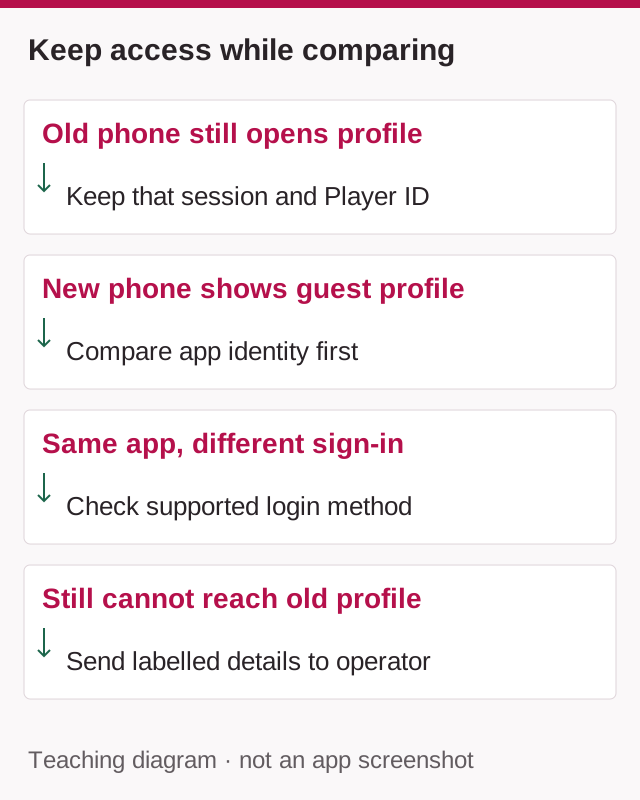
Imagine the old phone shows the expected Player ID, while the new phone opens a fresh guest profile. The old profile remains accessible. This example does not establish which sign-in features any Star build supports.
Do not describe this as a crash or assume that the old account has been deleted. First compare the application identity and the sign-in method. If the intended sign-in option is available, follow the operator's documented process; do not assume a phone backup transfers a guest account.
If the expected profile still cannot be reached, tell verified support which phone retains access and which login route was attempted. Keep the Player IDs labelled old and new. A support request can then distinguish a new profile from an inaccessible original one. Never pay an unofficial recovery agent or share an OTP to prove ownership.
Android Backup Does Not Guarantee Game Restoration
Android can back up applications and some app data, but Google explicitly notes that not every app can back up or restore all settings and data.
Restoration also depends on device and Android-version conditions. A successful phone transfer does not prove that every game session has been restored. Google’s Android backup and restore guidance.
Check whether the intended backup account and relevant backup were used during setup.
Do not factory-reset the new phone solely to repeat a transfer before establishing whether Teen Patti Star supports the required restoration.
Likewise, copying an APK from the old phone generally addresses application installation, not the complete recovery of its account state.
Avoid third-party tools that promise to extract or transfer private login tokens.
If the Player ID Matches but Progress Does Not
A matching Player ID changes the investigation.
Record exactly what is missing: chip balance, profile customisation, purchase entitlement, friends or progress in one game mode.
Check whether you are viewing the same screen and mode on both devices. Do not compare different counters and assume they represent one balance.
If the screen is still loading or an error appears, resolve that display problem before concluding that records were lost.
Do not make a new purchase to test whether the account is “active.” It can add a separate transaction without explaining the missing information.
Send support the matching ID and the before-and-after details. Ask whether the account data has loaded correctly and which record is authoritative.
If the Old Phone Is Lost or Already Reset
Recovery evidence becomes more important when the working session is unavailable.
Look for earlier screenshots, support conversations, purchase receipts and any account identifiers you saved.
An app-store library entry can help identify the application you previously installed. It does not necessarily identify the game account inside it.
If you made purchases, provide relevant order references through official support. Receipts may help an investigation, but they are not a guarantee that all progress or consumed virtual items can be restored.
State honestly what you do not know. “I do not have the Player ID” is more useful than guessing an identifier or copying one from an unrelated screenshot.
Prepare One Clear Recovery Request
A well-organised request reduces unnecessary back-and-forth.
| Detail | What to provide |
|---|---|
| Original account | Player ID and profile name, if known |
| New profile | New Player ID, clearly labelled |
| Old device | Model, platform and whether it is accessible |
| New device | Model and Android version |
| App identity | Store link or package ID |
| Sign-in information | Method used, without passwords |
| Timeline | Last successful access and phone-change date |
| Evidence | Relevant screenshots or order references |
| Previous attempts | Transfer, sign-in or reinstall steps already taken |
Original account
- What to provide
- Player ID and profile name, if known
New profile
- What to provide
- New Player ID, clearly labelled
Old device
- What to provide
- Model, platform and whether it is accessible
New device
- What to provide
- Model and Android version
App identity
- What to provide
- Store link or package ID
Sign-in information
- What to provide
- Method used, without passwords
Timeline
- What to provide
- Last successful access and phone-change date
Evidence
- What to provide
- Relevant screenshots or order references
Previous attempts
- What to provide
- Transfer, sign-in or reinstall steps already taken
Use a subject such as Teen Patti Star account missing after changing phones.
Explain whether you want access restored to the original account rather than a merge. Account merging and cross-platform transfer should not be assumed to be supported.
Example Support Message
Hello Support,
After moving to a new phone, Teen Patti Star opens with a different profile.
Original Player ID: [if known]
New Player ID: [if shown]
Old phone: [model and availability]
New phone and Android version: [details]
App version: [version]My last successful access to the original account was approximately [date]. I used [actual sign-in method, if known]. I have not reset the old phone or cleared its app data.
Please advise how to verify ownership and recover access to the original account. Please also confirm whether transfer is supported for my account type.
Thank you.
Do not add passwords, one-time codes, full card numbers or banking PINs.
Avoid Paid Recovery Offers
A stranger claiming to restore any account immediately cannot establish that capability merely by showing a logo or a screenshot.
Do not pay an “activation,” “migration” or “recovery” fee to an individual. Do not install a remote-access application or share the screen while sensitive login information is visible.
Use the support address on the matched store listing and preserve the conversation.
If support cannot recover the account, ask for a clear explanation of the limitation. No guide can promise restoration without access to the publisher’s records and verification process.
Frequently Asked Questions
Does changing phones delete the account?
Not necessarily. Loss of access and deletion are different events.
Will using the same Google Play account restore progress?
Not automatically. Store identity and in-game identity may differ.
Can a screenshot guarantee recovery?
No. It is supporting evidence, not proof that the operator can restore the account.
Should I delete the new profile first?
Ask support before doing so. Keep its identifier available to explain the mismatch.
When can I reset the old phone?
Wait until access is verified on the new device or the publisher has explained the recovery limitations. Preserve any records you still need before removing the old installation.
Sources & scope
Public sources checked on 9 September 2026. Examples are illustrative; no hands-on device test of a specific app was performed. Table and platform rules may differ.
Related guides
Account Help
Teen Patti Star OTP Not Received: What to Check
Separate an SMS delivery failure from an expired code or missing login option. Explains what to tell support without exposing private information.

App Versions
How to Check Your Teen Patti Star Version on Android
Find the version actually installed on your Android phone. Record the full number, distinguish it from Android and APK versions, and keep a support record.

Android Help
Teen Patti Star Not Opening or Crashing: What to Check on Android
Pinpoint where Teen Patti Star stops, record one repeatable launch attempt and compare results without confusing a connection change with a confirmed fix.