
App Versions
How to Check Your Teen Patti Star Version on Android
Open Settings → Apps → Teen Patti Star → App info. Look for the version, sometimes at the bottom or under Advanced. Record the full value without clearing data or uninstalling. A store update date and an APK filename are not your installed version.
Method: a public-documentation guide, not a hands-on test of a Star build. Diagrams are illustrative. Sources & limitations
Find the installed version first
Capture an observation, not a guessed result
This is a general walkthrough, not a tested Star-device session. Record the app already on your phone before opening a replacement APK. A useful evidence set has three separate views: the selected app’s App info, the phone’s Android version, and the original store or publisher page if available. Menus and exposed fields vary by device.
Swipe the table sideways to compare.
| Capture | Keep visible | Hide before sharing |
|---|---|---|
| App info for the selected icon | App name and displayed version | Notifications, account name and personal identifiers |
| Android version screen | Android version and phone model | IMEI, serial number and phone number |
| Original source page | Publisher, URL and the time checked | Signed-in account and private browser tabs |
App info for the selected icon
- Keep visible
- App name and displayed version
- Hide before sharing
- Notifications, account name and personal identifiers
Android version screen
- Keep visible
- Android version and phone model
- Hide before sharing
- IMEI, serial number and phone number
Original source page
- Keep visible
- Publisher, URL and the time checked
- Hide before sharing
- Signed-in account and private browser tabs
If a field is absent, write “not shown”; do not fill it using a filename or an unrelated screenshot. Keep the downloaded candidate’s metadata in a separate record. Checking a version should not require clearing storage, logging out or uninstalling the app.
Make a version record without changing the app
Long-press the icon you normally open, choose App info if available, and read the version field. If the field is absent, look in that app’s About or Help screen; record “not shown” if neither provides it. Do not substitute the number from a search result.
Use this short record when asking for help:
App shown on my phone: ___
Installed version, including suffix: ___
Where I found it: App info / About / not shown
Store or publisher link: ___ / unavailable
Android version and phone model: ___
If you have downloaded a file but not installed it, you have a candidate file version, not an installed version. Keep it in a second record. This one distinction prevents an APK filename from overwriting the evidence on your phone.
Which version are you trying to identify?
If the app is already on your phone, use its App info screen. If you only have a downloaded file, inspect that file separately: its version does not tell you what is installed.
Swipe the table sideways to compare.
| Your question | Use this evidence | Do not substitute |
|---|---|---|
| What is installed on this phone? | App info for the selected app | A download page's latest label |
| What is inside this APK? | Metadata from that exact file | Its filename |
| Is this a compatible, trusted update? | Package, signing history and publisher source | A larger version number alone |
What is installed on this phone?
- Use this evidence
- App info for the selected app
- Do not substitute
- A download page's latest label
What is inside this APK?
- Use this evidence
- Metadata from that exact file
- Do not substitute
- Its filename
Is this a compatible, trusted update?
- Use this evidence
- Package, signing history and publisher source
- Do not substitute
- A larger version number alone
Keep these as separate records. Before replacing the installed app, follow the APK identity checks. If Android rejects the installation, use the App not installed guide, not a version comparison alone.
Four numbers that should not be confused
Swipe the table sideways to compare.
| Field | What it tells you | What it does not tell you |
|---|---|---|
| Version name, e.g. 1.2.3 | The developer's readable release label | Whether an unrelated APK is authentic |
| Version code, e.g. 123 | Build ordering within that app | The Android version |
| Android version | The phone's operating system release | The installed game release |
| Store updated date | When that listing reports an update | Which build is installed on your phone |
Version name, e.g. 1.2.3
- What it tells you
- The developer's readable release label
- What it does not tell you
- Whether an unrelated APK is authentic
Version code, e.g. 123
- What it tells you
- Build ordering within that app
- What it does not tell you
- The Android version
Android version
- What it tells you
- The phone's operating system release
- What it does not tell you
- The installed game release
Store updated date
- What it tells you
- When that listing reports an update
- What it does not tell you
- Which build is installed on your phone
The numbers above are examples, not a current Star release record. Android Settings may not expose the internal version code. Do not install an unknown inspection app just to find it.
Connect the installed app to its store record
If App info offers App details in store, open it. Compare the publisher and listing rather than searching only the display name. A Google Play URL contains the application identifier after id=. If the store entry is unavailable, record that result; region, removal or sideloading can explain it. Unavailability alone is not proof of malware.
One publicly accessible Teen Patti Star listing checked on 6 September 2026 names Dream Global.TW and uses com.mengtegame.xingcakesfunny. This identifies that listing only. It does not establish that every Star-branded APK, including yours, comes from that publisher. This website's downloadable file is Teen Patti Master, not an update to that Star listing.
Why two phones can show different versions
Device compatibility and a staged rollout can produce different available updates. Before comparing a version number, compare the package, source and device. Do not replace an installed app merely because a download page displays a larger number.
| Observation | Check next |
|---|---|
| Same title, different package | Treat them as different apps |
| Same package, different versions | Compare store availability and device compatibility |
| A website says latest | Find a publisher-backed release record |
| Only one device has a problem | Record its Android version, model and exact error |
Same title, different package
- Check next
- Treat them as different apps
Same package, different versions
- Check next
- Compare store availability and device compatibility
A website says latest
- Check next
- Find a publisher-backed release record
Only one device has a problem
- Check next
- Record its Android version, model and exact error
Worked example: why “2.0” does not settle an update decision
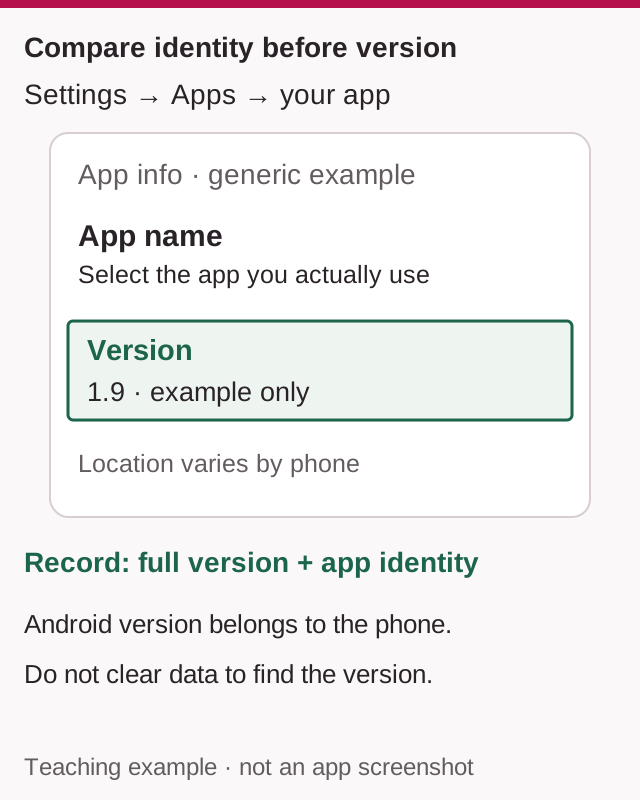
Suppose App info shows version 1.9 for an installed app. A website advertises an APK as version 2.0. These numbers are hypothetical, not Star release data.
If the package identifiers differ, the APK belongs to a different application identity: do not treat it as an update, however similar the icons look. If the package matches, the version label still does not establish the publisher or compatible signing history. Android's version code is separate from the readable version name.
Your useful conclusion is therefore not “2.0 is newer.” It is “I have identified the installed version; I still need the same-app release and signing evidence before replacing it.” If that evidence is missing, keep the working installation. You can finish the version-checking task without downloading anything.
Save a useful support record
Record the app title, version name, package if available, source URL, Android version and error time. Leave unknown fields marked unknown. Mask personal details in screenshots; do not include passwords, OTPs or payment PINs.
To check the operating system, use Settings → About phone → Android version. The Android build number belongs to the phone, not to Teen Patti Star.
Optional: inspect an APK without installing it
For readers already using the official Android SDK, apkanalyzer apk summary file.apk prints the application ID, version code and version name. Replace file.apk with the actual path. This reads file metadata; it neither identifies the version installed on another device nor certifies the file's safety.
Do I need to clear data to see the version?
No. Clear storage, Clear data and Uninstall are not version-checking steps. An unlinked guest profile may depend on local data. Keep those controls untouched while gathering your record.
Sources & scope
Specific sources revisited
These limited checks do not replace the original source dates below or constitute a device test.
Public sources checked on 6 September 2026. No hands-on device test was performed. Menus and table rules may differ.
Related guides
Safety
How to Verify a Teen Patti Star APK Before Installing
Compare an APK with a trusted reference. Learn what package, signature and hash matches establish—and what remains unverified.

Android Help
Teen Patti Star “App Not Installed”: Package Conflicts and Update Checks
Separate a failed first install from a rejected update, parsing error or launch crash. Keep the working app and choose the right checks.

App Versions
Teen Patti Star 2 APK: Same App, Update or Different Product?
Identify what “Star 2” refers to before downloading. Compare the publisher, package and release evidence without assuming it is a Star update.