
Safety
How to Verify a Teen Patti Star APK Before Installing
Start with the source and the exact app identity. A matching name, package or successful scan alone is not enough. If you cannot connect the file to the intended publisher and a trusted signing history, stop rather than uninstalling a working app to force an update.

Method: a public-documentation guide, not a hands-on test of a Star build. Diagrams are illustrative. Sources & limitations
Keep the reference separate from the file you are checking
Use a short comparison record before deciding whether to install. Leave missing values marked unknown; do not fill them from a similar-looking website.
Swipe the table sideways to compare.
| Record | Candidate APK | Independently trusted reference |
|---|---|---|
| Source | Exact page that supplied this file | Publisher-linked listing or release record |
| Application ID | Value read from this file | Identifier for the intended application |
| Signing certificate | Certificate reported for this file | Known signing history, including documented changes |
| Version | Version name and code from this file | Release information for the same app |
Source
- Candidate APK
- Exact page that supplied this file
- Independently trusted reference
- Publisher-linked listing or release record
Application ID
- Candidate APK
- Value read from this file
- Independently trusted reference
- Identifier for the intended application
Signing certificate
- Candidate APK
- Certificate reported for this file
- Independently trusted reference
- Known signing history, including documented changes
Version
- Candidate APK
- Version name and code from this file
- Independently trusted reference
- Release information for the same app
Two matching columns are useful only when the reference itself is trustworthy. If the source cannot establish the signing history, this guide cannot certify the file. For an already installed app, first record its version and identity. An installation error is not a reason to bypass these checks.
The practical decision: stop, investigate or continue checking
A stop/go record—not a safety score
Consider an illustrative file whose package matches your app and whose scan reports no detection, but whose source is a forwarded message and whose signing reference is missing. The correct result is publisher connection unresolved, not “two checks passed, therefore safe”.
Swipe the table sideways to compare.
| Evidence | Write down | Decision boundary |
|---|---|---|
| Distribution chain | Exact page linking to the file | A forwarded URL alone does not establish the publisher |
| File identity | Package, version and SHA-256 of this copy | Keep these separate from the website’s marketing name |
| Signing comparison | Trusted reference and whether it matches | No reference means no continuity conclusion |
| Device result | Not installed / installer message / observed behaviour | Successful installation is not a security audit |
Distribution chain
- Write down
- Exact page linking to the file
- Decision boundary
- A forwarded URL alone does not establish the publisher
File identity
- Write down
- Package, version and SHA-256 of this copy
- Decision boundary
- Keep these separate from the website’s marketing name
Signing comparison
- Write down
- Trusted reference and whether it matches
- Decision boundary
- No reference means no continuity conclusion
Device result
- Write down
- Not installed / installer message / observed behaviour
- Decision boundary
- Successful installation is not a security audit
Do not upload an APK containing private or proprietary material to a public scanning service without understanding its sharing policy. The checks below can be read without installing the candidate file.
The useful question is not whether a page says official. It is whether the evidence connects this particular file to the publisher you intended. Even a genuine application can have privacy or account risks. Verification is not a complete security audit.
Swipe the table sideways to compare.
| Finding | What it establishes | Your next step |
|---|---|---|
| Familiar name and icon | Recognisable branding only | Check package and publisher |
| Matching package | A matching identifier | Compare signing evidence and source |
| Different signer from the trusted release | A discrepancy needing explanation | Stop; ask about documented key rotation or distribution differences |
| Matching trusted SHA-256 | Byte-for-byte agreement with that reference | Still check who supplied the reference |
| No malware detected | No detection in that scan | Do not call it a safety guarantee |
| Unknown source or unexplained sensitive access | Missing trust or a concrete concern | Do not install |
Familiar name and icon
- What it establishes
- Recognisable branding only
- Your next step
- Check package and publisher
Matching package
- What it establishes
- A matching identifier
- Your next step
- Compare signing evidence and source
Different signer from the trusted release
- What it establishes
- A discrepancy needing explanation
- Your next step
- Stop; ask about documented key rotation or distribution differences
Matching trusted SHA-256
- What it establishes
- Byte-for-byte agreement with that reference
- Your next step
- Still check who supplied the reference
No malware detected
- What it establishes
- No detection in that scan
- Your next step
- Do not call it a safety guarantee
Unknown source or unexplained sensitive access
- What it establishes
- Missing trust or a concrete concern
- Your next step
- Do not install
Establish a source chain before opening the file
Begin from a known publisher listing or an already verified developer website. Follow its links rather than a chat attachment or search advertisement. HTTPS protects the connection but does not prove who operates a site. Similar artwork and an official badge are not independent evidence.
Our Download page supplies a Teen Patti Master file. It must not be used as evidence that a Star APK is genuine, or as an update for a different app called Star.
Compare identity without running the APK
If you already use Android SDK tools on a computer, apkanalyzer apk summary file.apk reads the package, version code and version name. apkanalyzer manifest permissions file.apk lists declared permissions. Use tools from Android Developers, not an installer promoted beside an unknown APK.
These commands inspect a file; they do not run the Android app. If this is outside your experience, prefer a recognised store or ask the verified publisher for the missing information rather than guessing.
Check the signing certificate, not just the package
The SDK command apksigner verify --verbose --print-certs file.apk checks signatures and prints certificate information. A valid signature means the file verifies against its own signer. To attribute it to a publisher, compare against an independently trusted release or publisher record.
A certificate change may involve legitimate key rotation or a different distribution channel. It still requires evidence. Do not remove a trusted installed app simply to bypass a signing conflict; that can erase local account data and removes an important warning.
What a hash can and cannot prove
A SHA-256 fingerprint compares exact bytes. A hash supplied by the same unknown download page adds no independent proof of authorship. Compare the entire value, not a short prefix. A mismatch may be a different release or a damaged file; do not silently treat it as the expected build.
Worked example: matching hashes with an untrusted reference
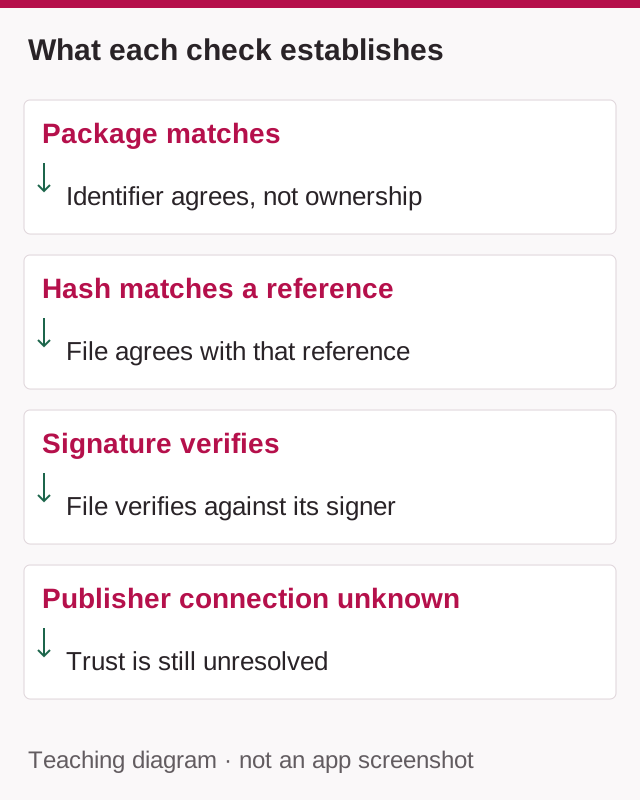
Imagine a download page displays a SHA-256 hash and your file matches it. This establishes agreement with the page's reference, not that the page belongs to the intended publisher. If both the APK and hash came from the same unknown operator, the identity question remains unanswered.
The same distinction applies to a valid APK signature: successful verification checks the file against its signer, while publisher attribution requires a trusted reference. A matching package name is another observation, not a substitute for that reference.
Record a result as “hash matches this source; publisher connection unverified” rather than “APK verified safe.” This wording separates what you measured from what you could not establish. Do not upload an APK containing private or proprietary material to a public scanning service without understanding its sharing policy.
Review permissions and security warnings
Permissions should have a reason tied to an actual feature. Contacts, SMS, call logs, accessibility or device-administrator access deserve particular scrutiny. Do not grant remote access to a stranger who offers installation help.
Keep Play Protect enabled. A request to switch it off does not repair a package or establish trust. If Google blocks or flags a file, preserve the warning and return to a verified source rather than following a bypass tutorial.
An installer promoted as a mod or unlimited-chip generator is a different problem from a routine update. The hack-claim risk guide explains the warning signs and separates next steps according to whether you installed a file or shared account information.
Before any update
Save the Player ID, login method and installed version. Confirm that account recovery is actually available for your account; do not assume a guest profile survives reinstallation. Keep purchase evidence private if it is relevant to support.
Use the comparison record above. Leave an unknown signing certificate marked unknown; other matching fields do not verify it.
Sources & scope
Public sources checked on 6 September 2026. No hands-on device test was performed. Menus and table rules may differ.
Related guides
App Versions
How to Check Your Teen Patti Star Version on Android
Find the version actually installed on your Android phone. Record the full number, distinguish it from Android and APK versions, and keep a support record.


App Versions
Teen Patti Star 2 APK: Same App, Update or Different Product?
Identify what “Star 2” refers to before downloading. Compare the publisher, package and release evidence without assuming it is a Star update.
Android Help
Teen Patti Star “App Not Installed”: Package Conflicts and Update Checks
Separate a failed first install from a rejected update, parsing error or launch crash. Keep the working app and choose the right checks.