
Account Help
Teen Patti Private Tables: Invite and Join Checks
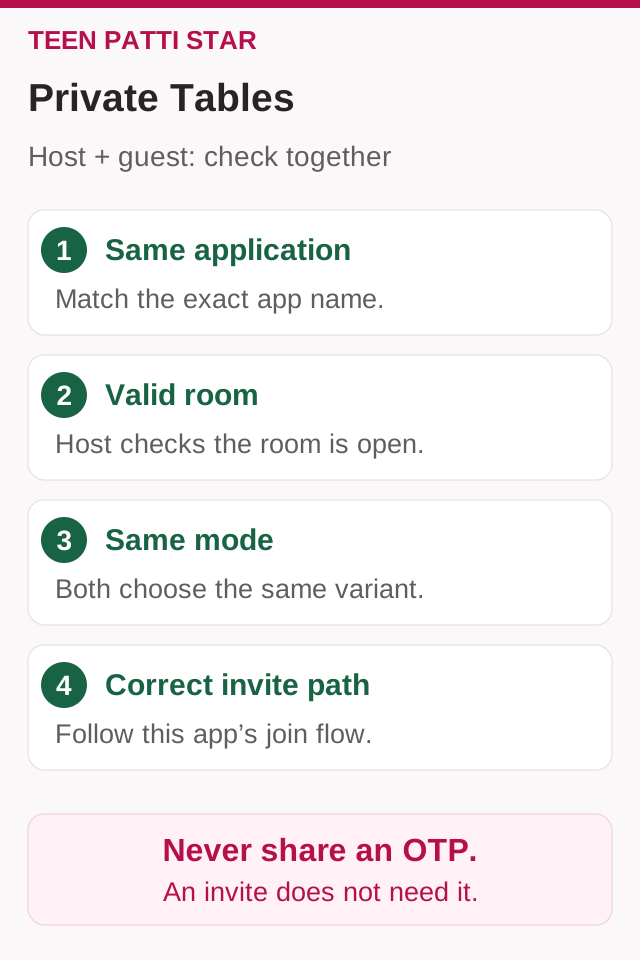
Friends need a compatible room inside the same application, not just a similarly named Teen Patti app. Check the product, room status and join conditions together; an invitation is never a reason to share an OTP or password.

Method: a public-documentation guide, not a hands-on test of a Star build. Diagrams are illustrative. Sources & limitations
A Teen Patti private table is a way to organise a session with invited people inside a particular app. It does not make different apps compatible, turn an online game into an offline one or create a cash-transfer arrangement. Successful joining starts with a simple agreement: the same intended app, the same session and an invitation sent through that app's supported route.
Octro's published flow provides the example below. The host opens a session; the joiner follows its invitation. Buttons, room codes and friend systems vary by app. No current interface testing is claimed.
Confirm the app and the room before sending invitations
Tell the group the full product name and publisher. “Teen Patti” or “King” alone may not be enough to identify an app. If necessary, share the official store page so everyone can compare the developer and Android package rather than only the icon.
Then agree on the intended mode and the table's displayed requirements. A private setting does not automatically remove the boot, chip requirements or normal rules of the chosen mode. The host should state the level before people join, particularly when some members are new.
| Agree before opening the session | Why it matters |
|---|---|
| Exact app and publisher | Prevents invitations being opened in a different product |
| One designated host | Avoids several parallel rooms with similar names |
| Mode and displayed table level | Lets everyone decide whether the session suits them |
| Invitation channel | Helps people know where to look for the current invitation |
| Start and finish time | Keeps a short social game from becoming an open-ended session |
Exact app and publisher
- Why it matters
- Prevents invitations being opened in a different product
One designated host
- Why it matters
- Avoids several parallel rooms with similar names
Mode and displayed table level
- Why it matters
- Lets everyone decide whether the session suits them
Invitation channel
- Why it matters
- Helps people know where to look for the current invitation
Start and finish time
- Why it matters
- Keeps a short social game from becoming an open-ended session
If the group is still choosing software, Gold versus Octro and the Gametion King guide explain the identities separately. An account in one product should not be assumed to provide membership or progress in another.
What Octro's published invitation instructions show
The Private Table section in Octro's learning guide documents this host sequence: open Private, select the boot, select friends and send Invite. Its illustrated friend-selection instructions refer to a Facebook connection, and it says the recipient receives an app request and notification. The introductory text also mentions WhatsApp invitations.
Treat this as a published flow, not a verified screenshot of today's version. The page does not establish that every current account sees those controls in the same place. In particular, it is not evidence that every table uses a numeric code or that all invitation channels behave identically.
When the screen differs, look for the current private or friends section and its help information. Do not install an older APK simply to reproduce an old screenshot. A tutorial is useful for understanding the roles—create, invite, accept—even when the interface has changed.
Host checklist: create one clear invitation
The following steps are a version-aware workflow. Use only options actually offered by the app, and read any confirmation before opening a table.
- Check that you are in the agreed app and intended account.
- Open the available private-table or friends-play route. Confirm the mode and displayed boot or participation requirement.
- Create or enter the session using the control provided. Check that the room you are about to share is the intended one.
- Use the available invitation method. If the app requests an optional social connection, decide whether that method suits the group; do not assume it is the only route unless the current app says so.
- Send the invitation to the intended participants and tell them where to find it. If a room identifier is displayed, copy it exactly instead of rewriting it from memory.
- Confirm that the expected members reached the same table before beginning the planned session.
If you replace a room, clearly mark the new invitation and retire the old one. Otherwise, the group can split between rooms and mistake that coordination problem for a connection failure.
Joiner checklist: follow the current session
The recipient's task is different from the host's. Creating another table is usually unhelpful when the intention is to join an existing group.
- Confirm who is hosting and which app they named.
- Open that app and check the intended sign-in. A familiar nickname alone does not confirm that you are in the same account used for a friend relationship.
- Find the invitation through the supported channel: for example, an in-app request or a link supplied by the host. Use the current invitation, not one from an earlier session.
- If the app actually provides code entry, paste the identifier into that field. Do not guess a code from a profile ID or send a login code instead.
- Check the host or room details and the table requirements before accepting or taking a seat.
- Tell the host once you arrive. If you cannot enter, record the exact error rather than repeatedly requesting new rooms.
If the invitation opens only the lobby, report that specific result and follow the displayed instructions. A precise description helps more than “the link is broken.”
When an invitation does not work
Start with the least disruptive checks. The aim is to identify which stage failed: delivery, opening the app, finding the session or taking a seat. This table lists possible checks, not confirmed causes in every product.
Swipe the table sideways to compare.
| What you see | First check | Useful information for the host or support |
|---|---|---|
| No invitation arrives | Correct recipient, account and invitation channel | Where you looked and when it was sent |
| Link opens the wrong app or a store page | Intended product and whether it is installed | Full product name and destination shown |
| App opens but room is missing | Current session and latest invitation | Whether the host replaced or closed the room |
| Room opens but joining is refused | Displayed requirements and any availability message | Exact wording, without guessing a hidden rule |
| Friend list is empty | Account and any social connection the app actually requires | Which sign-in or connection is active |
| You disconnect after joining | Connection stability and current room status | Time, error text and whether others stayed connected |
No invitation arrives
- First check
- Correct recipient, account and invitation channel
- Useful information for the host or support
- Where you looked and when it was sent
Link opens the wrong app or a store page
- First check
- Intended product and whether it is installed
- Useful information for the host or support
- Full product name and destination shown
App opens but room is missing
- First check
- Current session and latest invitation
- Useful information for the host or support
- Whether the host replaced or closed the room
Room opens but joining is refused
- First check
- Displayed requirements and any availability message
- Useful information for the host or support
- Exact wording, without guessing a hidden rule
Friend list is empty
- First check
- Account and any social connection the app actually requires
- Useful information for the host or support
- Which sign-in or connection is active
You disconnect after joining
- First check
- Connection stability and current room status
- Useful information for the host or support
- Time, error text and whether others stayed connected
Do not invent an expiry time, level threshold or seat limit from these symptoms. Those details depend on the app and current room. If an update is relevant, use the official distribution route. Reinstalling or deleting data should not be the first response when account recovery is uncertain.
Keep room details separate from login secrets
A room invitation and an account login code serve different purposes. Share only what the supported joining process asks you to share with the intended group. An OTP, password, recovery code or payment PIN is not a substitute for a room identifier.
“Private” describes access to a session; it is not a promise of end-to-end encryption, anonymity or control over what another participant records. Keep invitations within the intended group. If an unexpected person appears, use the host controls the app actually provides and ask support about any unclear access behaviour.
Private tables also remain subject to the product's money model. Creating a room does not make virtual chips redeemable or establish a legitimate outside settlement service. Agree on a virtual-chip level that suits the group without asking anybody to make a purchase simply to keep up.
If the group needs another way to play
An online private table still needs the connectivity required by the app. If people are together and the connection is unreliable, a physical deck is a separate alternative. Our offline Teen Patti guide explains how to organise that session without assuming an app offers offline multiplayer.
For persistent app problems, send a short report through verified support: product, version, device, invitation stage, approximate time and error text. See the customer-care guide for contact checks. Include a redacted screenshot only if useful; an unredacted group conversation or another person's account details adds unnecessary exposure.
Frequently asked questions
Does every Teen Patti private table use a room code?
No universal code system was verified. Some documented flows use friend invitations. Follow the method displayed by your app and avoid confusing a player ID with a room identifier.
Can a Gold player join an Octro private table?
Do not assume different products can share a session. The group should agree on one app and its supported invitation route before trying to join.
Is a private table an offline game?
No. Restricted invitations and network requirements are different questions. Check the app's connectivity requirements or use a physical deck when playing together without internet.
Can I rejoin automatically after disconnecting?
That depends on the app and whether the session remains available. Reopen the intended app, inspect the current instructions and ask the host about the room status. A saved seat or automatic chip restoration should not be promised.
What should I send when asking for help?
State the exact app, your role as host or joiner, the failed step and the error message. Keep login secrets and other players' private details out of public posts.
Sources & scope
Public sources checked on 26 October 2026. Examples are illustrative; no hands-on device test of a specific app was performed. Table and platform rules may differ.
- Octro — Private-table help
- Google Play — Gametion King private-table description
- Google Play — Teen Patti by Octro
Related guides
App Guides
Teen Patti Gold vs Octro: Which Fits Your Game?
Compare Gold and Octro by publisher, app identity, game modes, private tables and account needs. Separate listing claims from features needing a device check.

App Guides
Teen Patti King by Gametion: Modes and Chip Rules
Identify Gametion’s Teen Patti King, check its Android package, understand virtual chips and assess game modes before following a same-name APK link.
Gameplay
How to Play Teen Patti Offline with Friends: Setup and Step-by-Step Rules
Set up a four-player Teen Patti game with a deck and no-money counters. Follow the deal, Blind/Seen turns, Show and a checked 15-counter round.